Reports
The Reports page gives you a read on how the business is doing: revenue, cash collected, jobs, client activity, and team and service performance, all for the period you choose. You can also export any of it as a CSV. Find it under Reports in the sidebar.
Written By David Dayan
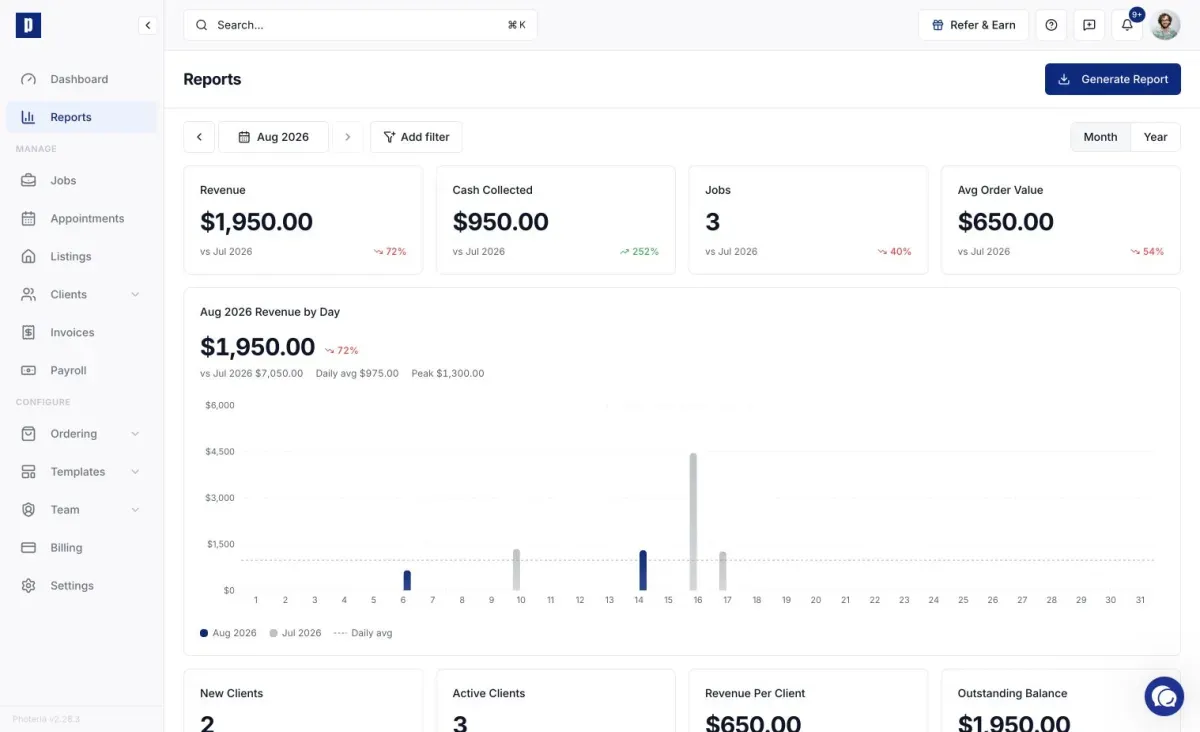
The Reports page gives you a read on how the business is doing: revenue, cash collected, jobs, client activity, and team and service performance, all for the period you choose. You can also export any of it as a CSV. Find it under Reports in the sidebar.
You need the Invoices: Read or Invoices: Manage permission to see the page. If Reports isn't in your sidebar, ask an admin to update your role.
Reading the report
Pick a month with the month picker, and optionally filter to one brokerage or client. Everything on the page respects those choices.
- KPI cards - revenue, cash collected, job count, average order value, and client metrics like new and active clients, revenue per client, and outstanding balance. Most show a comparison to the previous period.
- Revenue chart - this month against last month, or this year against last. Toggle between Month and Year scope above the chart.
- Breakdown tables - revenue by service, your top agents, team performance, payment methods, and your most inactive clients. Switch the card to Month or Year scope as needed.
Exporting a CSV
Click Generate Report to open the export dialog. Pick a report type, choose a date range (use a preset or a custom range), and click Get Report to download the CSV.
The types are:
- Overview - summary metrics for the date range.
- Orders - every order with client, property, services, team, and totals.
- Payments - collected payments by client, property, method, and amount.
- Services - each service, times sold, and revenue.
- Clients - order count and revenue per client.
- Photographers - shoots assigned and revenue per photographer.
- Inactive Clients - clients with no recent orders.
- Outstanding Balances - orders with money still due.